Most people see an .mp4 file, double-click it and expect a video to play.
Early in my engineering journey I did the same. We treat the file extension as if it’s the video itself. But if you’ve ever tried to play a file only to hear audio with a black screen or if a crash left you with a completely unplayable recording you’ve brushed up against a fundamental truth of digital media.
An MP4 is not a video. It’s a highly structured container.
The technical term is a “container” based on the ISO Base Media File Format. Understanding how this container is organized under the hood changes how you approach streaming architecture, video recovery and media debugging.
The Mental Model: The Encyclopedia
Imagine someone hands you a massive 10,000-page encyclopedia.
You look at the cover to see what kind of book it is. You flip to the index and table of contents to find exactly where specific chapters live. Then you turn to the massive stack of pages to actually read the information.
If someone ripped out the index the pages would still be full of perfectly valid information. However finding anything specific or knowing where one chapter ends and another begins would be nearly impossible. You’d just be staring at an endless sea of words.
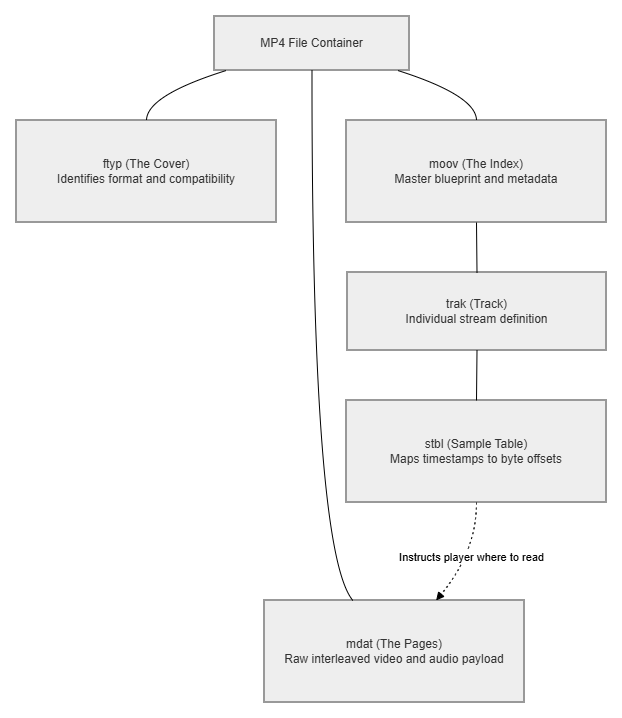
That is exactly how an MP4 file works. It’s built using hierarchical data blocks called “atoms” or “boxes.”
Inside the Container: The Essential Atoms
Every box in an MP4 has a specific four-letter label and a size indicator. If a media player doesn’t recognize a label it simply skips it. But to successfully play a video a player must read a few critical boxes.
ftyp: The Cover and ISBN
This is the very first box in the file. It tells the operating system and the media player exactly what they’re looking at. It clarifies if the file is a standard MP4, an Apple QuickTime file (.mov) or a specialized streaming format.
mdat: The Pages (Media Data)
This is the largest part of the file. It contains the raw 1s and 0s of your video frames and audio samples. The most important thing to understand about mdat is that it’s completely blind. It’s just a massive stream of interleaved data. Just like pages missing their numbers without instructions your computer can’t tell where a video frame ends and an audio snippet begins.
moov: The Index (Movie Box)
This is the brains of the file. The moov box is a complex nested hierarchy of metadata that acts as the table of contents. It tells the player exactly how to decode the mdat pages. It contains several vital sub-boxes:
trak(Track): Defines the individual streams. You’ll typically have one trak for video, one for audio and maybe another for subtitles.stbl(Sample Table): This is the master index. It maps exact timestamps to specific byte offsets within the giantmdatbox. This is what allows you to fast-forward to the 10-minute mark without having to decode the first 9 minutes.
The Container vs. The Codec
It’s crucial to understand that the MP4 container doesn’t actually care how your video is compressed.
The MP4 is just the book binding holding the data. The actual video data inside the mdat box is compressed using a mathematical formula called a codec (like H.264, HEVC or AV1).
Think of the container as the physical book and the codec as the language the text is written in. If a player understands the MP4 container but doesn’t speak the H.264 codec language the video won’t play. (We’ll explore the deep mechanics of codecs and raw bitstream analysis in an upcoming article).
A High-Level Look at the Atom Ecosystem
The boxes mentioned above are just the bare minimum needed for playback. The ISO standard defines dozens of these atoms for different use cases. Here is a high-level look at a few more:
| Atom | Name | Purpose |
|---|---|---|
ftyp | File Type | Identifies the file format and compatibility. |
moov | Movie | The master container for all metadata and indexes. |
mdat | Media Data | Holds the raw interleaved video and audio payloads. |
trak | Track | Defines a single stream (video, audio or subtitles). |
stbl | Sample Table | Maps playback time to exact byte offsets. |
udta | User Data | Stores custom metadata like location coordinates or copyright info. |
edts | Edit List | Instructs the player to skip or loop certain parts of the media. |
free | Free Space | Empty padding boxes used to reserve space for future metadata edits. |
Practical Application: Troubleshooting Media
When you understand the box structure media errors stop being mysterious. You can diagnose exactly where the failure is occurring.
Symptom 1: The Power Outage Corruption
The video was recording during a power outage and now the file refuses to open.
- The Diagnosis: The
moovbox is usually written at the very end of a recording session. If the power fails themoovbox is never saved. Themdatbox is full of perfect video data but the player has no index to read it. - The Fix: You must use a media repair tool to rebuild the
moovbox using a working video from the same camera as a reference dictionary.
Symptom 2: The Infinite Web Buffer
The video plays perfectly on your computer but buffers endlessly when embedded on a website.
- The Diagnosis: Atom ordering. By default some encoders place the
moovbox at the very end of the file. A web browser can’t start playing the video until it reads themoovinstructions. If the file is 2GB the browser has to download the entire 2GB just to find the instructions at the end. - The Fix: Move the
moovbox to the front of the file (right afterftyp). You can easily do this via the terminal with FFmpeg:ffmpeg -i input.mp4 -c copy -movflags +faststart output.mp4
Symptom 3: The Black Screen
The audio plays perfectly but the video is just a black screen.
- The Diagnosis: This is a codec issue rather than a container issue. The player read the moov blueprint successfully but when it went into the mdat box to get the video it realized it lacked the specific mathematical formula (codec) to decode the images.
Quick Tip: Look Inside the Box Yourself
You don’t have to take my word for it. If you want to truly understand how these files work point your terminal at a video on your hard drive. Here are the tools builders use:
- Bento4 (mp4dump): Prints out the exact visual tree of the box hierarchy so you can see the ftyp, moov and mdat atoms nested perfectly.
- FFmpeg (ffprobe): The undisputed standard of media processing. Run this to see everything about your streams and container metadata:
ffprobe -v error -show_format -show_streams your_video.mp4 - MP4Box (GPAC): A powerful multimedia packager that can inspect, manipulate and repair the internal atom structure.
The Takeaway
The next time you click an .mp4 file remember that you aren’t just opening a video. You are opening a meticulously structured database. When you separate the instructions (moov) from the payload (mdat) and when you decouple the container (MP4) from the codec (H.264) media architecture stops being magic. It becomes a logical predictable system that you can dissect, debug and build upon.